In today’s fast-paced world, an agency office thrives on seamless operations, client satisfaction, and, most importantly, security. With a constant flow of clients, couriers, and team members, managing your front door efficiently is not just a convenience—it’s a necessity. Traditional intercoms often fall short, leaving gaps in security and productivity. This is where a robust video doorbell system steps in, transforming your entryway into an intelligent command center that enhances safety, streamlines visitor management, and ensures your team can focus on what they do best: creating impactful work.
What is a Video Doorbell?
At its core, a video doorbell is a smart device that integrates a traditional doorbell with a high-definition camera, a microphone, and a speaker. When a visitor presses the button, or motion is detected, it sends an alert to connected devices, typically smartphones or tablets, allowing you to see, hear, and speak to the person at your door, regardless of your physical location. These devices have evolved significantly from basic audio-only intercoms, now offering advanced features that cater to the unique demands of a modern office environment.
Key components of a video doorbell include a durable external unit housing the camera lens, often with a wide field of view, and infrared sensors for night vision. Internally, a chime unit signals arrivals, while a connection to your office’s Wi-Fi network enables remote communication and data transfer. The evolution of these systems has moved from simple recording to sophisticated platforms capable of distinguishing between people, packages, and even familiar faces, making them indispensable tools for comprehensive security and operational efficiency.
Why Should Your Agency Office Use a Video Doorbell?
For a busy agency, the benefits of integrating a video doorbell go far beyond simply knowing who’s at the door. It’s about empowering your team, enhancing security, and maintaining a professional image.
- Elevated Security and Deterrence: A visible video doorbell acts as a powerful deterrent against unauthorized access and potential theft. You can screen every visitor, verifying their identity before granting entry, which is crucial for protecting sensitive information and valuable equipment. In the event of an incident, high-definition recordings provide invaluable evidence.
- Seamless Visitor and Delivery Management: Imagine receiving a crucial package while your team is deep in a client pitch. A video doorbell allows you to communicate with the delivery person remotely, providing instructions or unlocking the door, ensuring no important deliveries are missed. For clients, you can greet them virtually even if the receptionist is away, creating a welcoming first impression.
- Enhanced Team Productivity: Constant interruptions to answer the door can disrupt workflow. With a video doorbell, designated team members can manage entry from their desks or mobile devices, minimizing distractions and allowing everyone to concentrate on their tasks. Some systems even offer business hours scheduling, automatically adjusting monitoring modes to match your agency’s operational flow.
- Comprehensive Monitoring and Audit Trails: Modern video doorbells offer continuous recording or motion-activated footage, providing a detailed log of all activity at your entrance. This creates an invaluable audit trail, allowing you to review who entered or exited, and when, which can be critical for security, compliance, or even resolving internal disputes.
“For an agency, a video doorbell isn’t just a security gadget; it’s a productivity booster and a crucial layer of professional client interaction, ensuring no opportunity or delivery is missed.” – Alex Chen, Security Systems Expert
Types of Video Doorbells Popular for Business Use
The market offers a diverse range of video doorbells, each with specific features suitable for different office needs. Understanding the distinctions is key to making the right choice.
Connectivity Options
- Wired Video Doorbells: These systems connect directly to your building’s existing doorbell wiring or via Power over Ethernet (PoE). Wired options offer continuous power, eliminating battery concerns and ensuring 24/7 uptime, which is vital for high-traffic agency offices. PoE variants provide both power and internet connection through a single cable, enhancing reliability and data security.
- Wireless (Battery-Powered) Video Doorbells: Offering maximum installation flexibility, wireless doorbells are powered by rechargeable batteries. They are ideal for offices where hardwiring is not feasible or for temporary setups. While convenient, battery life and periodic recharging are considerations.
|
Our Picks for the Best Video doorbell in 2026
As an Amazon Associate I earn from qualifying purchases.
|
||
| Num | Product | Action |
|---|---|---|
| 1 | Tapo 2K Wireless Smart Video Doorbell with Chime - 160° Ultra-Wide View,Person Detection, Ring Call, 2-Way Audio, Subscription-Free Local Storage/Optional Cloud, Motion Only Alert, D210 |

|
| 2 | Arlo Video Doorbell 2K (2nd Gen, Latest Release), Wireless or Wired Option, 2-Way Audio, Night Vision, Head to Toe Video View, Package Detection, Person & Vehicle Recognition, 1-Month Secure Plan |
|
| 3 | Blink Video Doorbell (newest model) – Head-to-toe HD view, two-year battery life, and simple setup. Sync Module Core included – System (Black) |
|
| 4 | youkey Dual Camera Wireless Video Doorbell — Head-to-Toe View, 2K FHD Battery Doorbell with Local Storage No Monthly Fee, Package Detection, 5Ghz WiFi, Works with Alexa & Google Assistant, DB312 |
|
| 5 | Ring Video Wired Doorbell (newest model), Home or business security, Two-Way Talk, advanced motion detection, HD camera and real-time alerts to monitor your front door (wiring required) |
|
| 6 | Orbitell 1080p Wireless Wi-Fi Video Doorbell Camera with Two Way Audio, Night Vision, Cloud Storage, Smart AI Motion Detection, Support 2.4GHz Wi-Fi only |
|
| 7 | eufy Security Video Doorbell, No Subscription, Dual Cameras, 2K FHD,Head-to-Toe View, Doorbell Camera Wireless & Wired, Color Night Vision, Two-Way Talk, AI Motion/Package Detection, Built-in 8GB |
|
| 8 | Ring Battery Doorbell, Home or business security with Head-to-Toe video, Live View with Two-Way Talk, and Motion Detection & Alerts, Satin Nickel |
|
| 9 | Ring Battery Doorbell, Home or business security with Head-to-Toe video, Live View with Two-Way Talk, and Motion Detection & Alerts, Venetian Bronze |
|
| 10 | Blink Video Doorbell (newest model) – Head-to-toe HD view, two-year battery life, and simple setup. Required Sync Module not included – Add-On (Black) |
|
Feature-Based Classifications
- High-Resolution Recording and Storage: Most business-grade video doorbells offer 1080p, 2K, or even 4K resolution, providing crystal-clear video footage essential for identifying individuals or details like license plates. Storage options include local storage (SD cards, Network Video Recorders/NVRs) for on-site data retention, and cloud storage (often subscription-based) which offers off-site backup, protection against device theft, and remote access to recordings.
- Two-Way Audio and Remote Communication: This fundamental feature allows you to speak directly with visitors through the doorbell’s built-in speaker and microphone via your smartphone app, even when you’re not in the office.
- Advanced Motion Detection and Smart Alerts: Beyond basic motion sensing, advanced systems can differentiate between people, vehicles, and packages, reducing false alarms from environmental factors. Customizable activity zones allow you to focus monitoring on specific areas, such as your doorway, while ignoring busy sidewalks.
- AI Integration and Facial Recognition: Cutting-edge video doorbells incorporate Artificial Intelligence to offer features like facial recognition, identifying known clients or employees, and custom visitor tagging for tracking contractors or specific deliveries. This intelligence minimizes unwanted notifications and provides tailored insights.
- Access Control Integration: For heightened security, many commercial video doorbells seamlessly integrate with electronic door locks, key fob/ID card readers, and even full-fledged intrusion detection systems, allowing remote unlocking and unified security management.
Comparing Popular Video Doorbell Brands for Offices
When selecting a video doorbell for your agency, certain brands stand out for their features, reliability, and suitability for commercial environments.
| Brand | Key Features for Office Use | Pros | Cons |
|---|---|---|---|
| Lorex Pro | Wired PoE, 24/7 uptime, business hours scheduling, custom visitor tagging, on-prem NVR integration (30+ days). | Extremely reliable, robust commercial features, no subscription lock-in with NVR. | May require professional installation, higher initial cost. |
| Arlo | Wireless flexibility, 2K HDR video, local SD card option, third-party support, person/package detection. | Versatile, good for smaller offices or temporary setups, clear video. | Battery life management, local storage is limited without cloud subscription. |
| Ring Pro | Amazon ecosystem integration, business visitor management, customer analytics, multi-cam live view, 2K/4K video. | Extensive ecosystem, detailed analytics, strong for businesses already using Amazon services. | Requires Ring Protect Pro subscription for full business features. |
| Nest (Google) | 2K video, some free cloud storage (6 hours), package detection without subscription, Google Home integration. | User-friendly, good value with free features, seamless smart home integration. | May lack some advanced commercial-specific features found in dedicated business systems, no battery backup. |
| DMP | Integrates with intrusion detection and access control, 1080p, 180° lens, supports multiple doorbells (up to 8), remote unlock. | Designed for integrated security, scalable for multiple entrances, robust access control. | Specialized system, often requires professional installation and specific security providers. |
| Swiftlane | Commercial video intercom, touchless access (facial recognition), HD video/audio, mobile app, durable, scalable. | High-end security, advanced access control, professional aesthetic, enterprise-grade features. | Higher investment, potentially complex setup. |
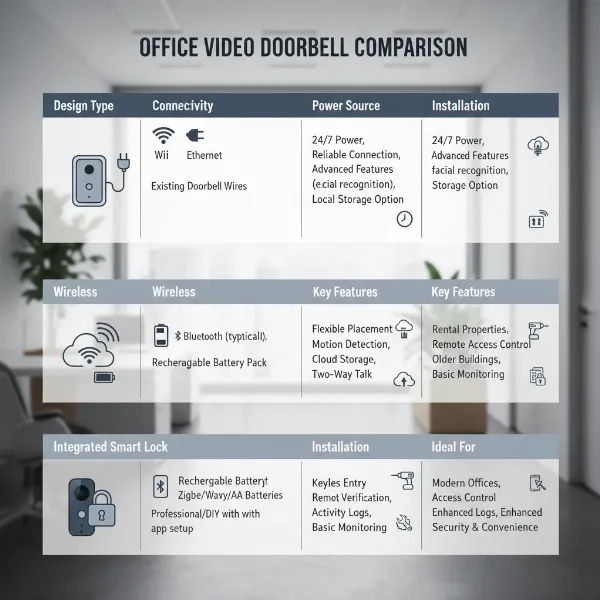 Comparing different video doorbell models with a table highlighting features for an agency office
How to Choose the Right Video Doorbell for Your Agency Office
Selecting the perfect video doorbell involves a strategic assessment of your agency’s unique operational needs, security requirements, and budget.
-
Assess Your Agency’s Specific Needs:
- Traffic Volume: Does your office experience constant client visits, frequent deliveries, or mostly internal staff movement? High traffic might necessitate a wired PoE system for unwavering reliability, while lower traffic might suit a robust wireless option.
- Security Priority: Is your main goal to deter theft, manage access for sensitive areas, or simply streamline visitor entry? This will guide your need for advanced features like AI detection, integration with access control, or professional monitoring.
- Package Management: If your agency receives many packages, consider models with dedicated package detection or dual cameras for a full view of items left at the door.
- Team Collaboration: Look for systems that support multi-user access with customizable roles and permissions, ensuring relevant team members can respond to alerts and manage visitors.
-
Define Your Budget: Consider not only the initial purchase and installation costs but also ongoing expenses. Many advanced features and cloud storage options come with monthly or annual subscription fees. Calculate the Total Cost of Ownership (TCO) over several years.
-
Prioritize Essential Features:
- Video Quality: Aim for at least 2K resolution for clear identification.
- Reliable Motion Detection: With smart alerts to distinguish people from other movements, reducing false alarms.
- Two-Way Audio: Clear communication is non-negotiable.
- Night Vision: Infrared capabilities are crucial for after-hours security.
- Storage: Decide between local-only, cloud-only, or a hybrid solution based on your retention needs and budget.
-
Evaluate Brand Reputation and Integration: Research brands known for commercial solutions and strong customer support. Check for compatibility with your existing smart office systems (e.g., Google Workspace, Amazon Alexa for Business) and other security infrastructure like CCTV or access control systems.
-
Consider Installation and Support: Some systems are DIY-friendly, but for comprehensive commercial solutions, professional installation is often recommended to ensure optimal performance and integration with your broader security ecosystem. Always review warranty terms and ongoing customer support options.
Setting Up and Using Your Office Video Doorbell
Once you’ve chosen the ideal video doorbell, proper installation and configuration are crucial for maximizing its benefits.
Installation:
- Wired Systems: If opting for a wired or PoE system, professional installation is often advisable, especially for integrating with existing electrical systems or network infrastructure. This ensures a stable power supply and robust network connection, crucial for 24/7 reliability.
- Wireless Systems: Battery-powered units are simpler to install, typically requiring mounting and connecting to your Wi-Fi network. Ensure the chosen location has strong Wi-Fi signal and is easily accessible for battery recharging.
Basic Usage and Configuration:
- App Integration: Download the manufacturer’s mobile app and connect your doorbell. This app will be your primary interface for live viewing, receiving alerts, and communicating with visitors.
- Motion Zone Customization: Set up specific “activity zones” to monitor only relevant areas, such as your doorway, avoiding unnecessary alerts from public sidewalks or busy roads. This significantly reduces notification fatigue for your team.
- User Management: Configure multi-user access for your team, assigning different permission levels as needed (e.g., administrative access for office managers, viewing/talk access for general staff).
- Notifications: Customize alert preferences to ensure critical notifications are received without overwhelming your team. Integrate with other office communication tools if possible.
Troubleshooting Tips:
- Wi-Fi Connectivity: A strong and stable Wi-Fi connection is paramount. If experiencing dropped signals or slow performance, consider a Wi-Fi extender or upgrading your office router.
- Motion Sensitivity: Adjust motion sensitivity settings to find the right balance, preventing excessive false alarms while still capturing important events.
- Power Issues: For wired doorbells, check wiring connections. For wireless, ensure batteries are charged and holding their charge.
Important Considerations for Office Video Doorbells
Implementing a video doorbell in an office environment introduces unique considerations, particularly around privacy, legal compliance, and data management.
Privacy and Legal Compliance
While video doorbells are legal, their use in commercial settings requires careful attention to privacy laws, which vary by jurisdiction.
- Video Recording: Generally, it is legal to record video in public areas where there is no reasonable expectation of privacy, such as your office’s exterior entrance visible from a public sidewalk.
- Audio Recording: This area is more complex. Federal law often allows “one-party consent,” meaning you can record a conversation if at least one person involved (you or a team member) consents. However, some states require “all-party consent,” where every individual in the conversation must agree to be recorded. For outdoor areas like a front porch, there is generally no expectation of privacy for conversations that can be overheard by the public. Agencies should consult local and state laws and consider posting clear signage indicating audio and video recording is in progress.
- Camera Placement: Ensure your camera’s field of view focuses on your property and does not unnecessarily infringe on neighboring businesses’ entrances or private areas.
- Transparency: Inform employees, visitors, and clients about the presence of video and audio recording devices. This can be done through clear signage at the entrance.
Data Security and Storage
Your video doorbell will capture sensitive data. Ensure the system you choose offers robust data security.
- Encryption: Look for devices and cloud services that employ strong encryption for both data transmission and storage to protect your footage from unauthorized access.
- Cloud vs. Local Storage: Cloud storage provides off-site backup, safeguarding footage even if the physical device is tampered with or stolen. However, it typically involves subscription fees. Local storage offers direct control over your data but is vulnerable to physical tampering. Many businesses opt for a hybrid approach.
Maintenance and Scalability
Regular maintenance ensures your video doorbell operates effectively. This includes routine cleaning of the lens, updating firmware for security patches and new features, and checking battery life for wireless models. Consider if the system can scale with your agency’s growth—can you add more doorbells for additional entrances or integrate with new security systems as your needs evolve?
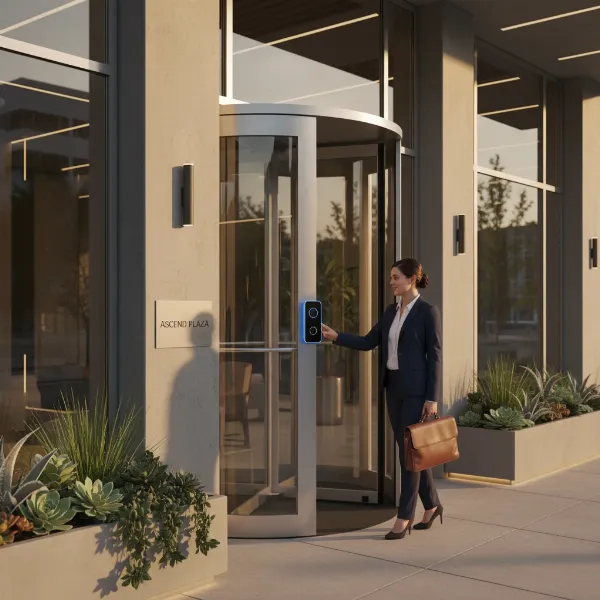 A modern office entrance with a video doorbell mounted, emphasizing security and accessibility
Conclusion
Choosing the best video doorbell for your busy agency office team is a strategic decision that profoundly impacts security, efficiency, and professionalism. By carefully evaluating connectivity, features, brand reputation, and crucial considerations like privacy and data security, you can select a system that not only safeguards your premises but also streamlines daily operations. The right video doorbell empowers your team to manage visitors and deliveries with unprecedented ease, allowing them to remain focused on delivering exceptional work.
Are you ready to transform your office’s entryway into a smart, secure, and highly efficient access point?