In today’s interconnected world, smart technology is revolutionizing how we interact with our homes. Among the most popular innovations in home security, the video doorbell stands out, offering a blend of surveillance, communication, and convenience. These devices promise real-time video, two-way audio, and remote monitoring directly to your smartphone, fundamentally changing how you manage your front door. But with a myriad of options and features available, the crucial question remains: are video doorbells truly worth the investment for your home? This comprehensive guide will explore the capabilities, benefits, types, leading brands, and essential considerations to help you decide if a video doorbell is the optimal security solution for your needs.
What is a Video Doorbell?
A video doorbell is a sophisticated smart home security device that integrates the traditional doorbell function with advanced monitoring capabilities. It is essentially a compact system equipped with a built-in camera, microphone, and speaker, all connected to your home’s Wi-Fi network. This allows homeowners to remotely see, hear, and speak to visitors at their door through a dedicated smartphone application, providing an unprecedented level of awareness and control over their home’s entrance.
The primary components of a typical video doorbell include a high-definition camera, often offering resolutions ranging from 1080p to 4K, sometimes with High Dynamic Range (HDR) for clearer images in varied lighting conditions. A microphone and speaker facilitate two-way audio, enabling seamless conversation with visitors. Most models incorporate advanced motion sensors, utilizing infrared or radar technology, with some even leveraging artificial intelligence to differentiate between people, animals, and vehicles, thus reducing false alarms. These devices connect to your home Wi-Fi, transmitting compressed video data and alerts to a secure server and then to your mobile device, often in under a second. While their core function remains announcing visitors, video doorbells have evolved significantly from simple chimes into comprehensive smart security tools that offer constant vigilance and peace of mind.
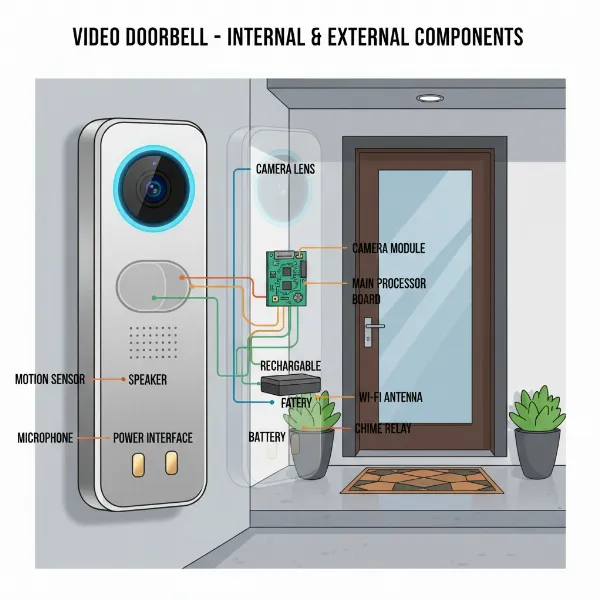 A detailed diagram showing the main components of a video doorbell, including the camera lens, motion sensor, speaker, microphone, and power connection, set against a modern home exterior.
Why Consider a Video Doorbell?
The adoption of video doorbells has surged due to the multifaceted benefits they offer, extending far beyond simple visitor notification. For many homeowners, these devices are a pivotal upgrade to their home security and daily convenience.
Primarily, video doorbells enhance security by providing real-time video surveillance of your entryway. You can identify who is at your door before opening it, which is invaluable for unexpected callers or when you’re hesitant to engage. The visible presence of a camera itself often acts as a deterrent to potential intruders or package thieves, with statistics suggesting a correlation between increased home security equipment and reduced burglaries. Motion sensors alert you to any activity near your front door, allowing you to react swiftly if anything seems amiss.
Beyond security, video doorbells offer immense convenience. Whether you’re at work, on vacation, or simply in another room, you can monitor your front door from anywhere. This means you can instruct delivery personnel where to leave packages, greet friends when you’re running late, or screen solicitors without needing to physically go to the door. This level of remote interaction provides unparalleled control and flexibility.
In unfortunate events, video doorbells serve as crucial tools for evidence collection. Should a package be stolen or an attempted break-in occur, the recorded footage can be vital for law enforcement and insurance claims. The peace of mind derived from constant monitoring, often supplemented by night vision capabilities for clear views in the dark, is another significant advantage. Furthermore, many video doorbells seamlessly integrate with other smart home systems, such as smart locks and lighting, creating a cohesive and automated security ecosystem that simplifies management and enhances responsiveness. Some insurance providers even offer discounts for homes equipped with smart security devices, potentially offsetting part of the initial investment.
Popular Video Doorbell Types
Video doorbells primarily differ in their power source and the advanced features they offer. Understanding these distinctions is crucial for selecting a device that aligns with your home’s infrastructure and specific security demands.
By Connection Type:
- Wired Video Doorbells: These devices connect directly to your home’s existing doorbell wiring, ensuring a continuous power supply.
- Pros: Consistent power means no battery recharging, enabling features like 24/7 continuous video recording (CVR). They often provide superior HD video quality due to higher data throughput and support more advanced motion detection algorithms. Wired models tend to be highly reliable with stable performance.
- Cons: Installation can be more complex, often requiring existing wiring or professional assistance, especially in older homes without current doorbell systems. Their placement is also less flexible, limited by the wiring location.
- Wireless (Battery-Powered) Video Doorbells: These doorbells operate on rechargeable batteries and connect to your home’s Wi-Fi network.
- Pros: Installation is typically easy and DIY-friendly, as no electrical wiring is needed. This offers greater flexibility in placement, making them ideal for renters or homes without pre-existing doorbell wiring.
- Cons: Batteries require periodic recharging or replacement, which can be inconvenient. Performance, including video and audio quality, can be contingent on Wi-Fi signal strength. Most battery-powered models primarily offer motion-triggered recording to conserve battery life, rather than 24/7 CVR.
By Features:
Modern video doorbells come equipped with a range of features designed to enhance security and user experience:
- Video Recording Quality: Devices offer various resolutions (1080p, 2K, 4K) with features like HDR for improved clarity. Many now boast a wide or vertically oriented field of view to better capture packages at your doorstep.
- Two-Way Audio: This fundamental feature allows you to speak with visitors through the doorbell’s built-in speaker and microphone via your smartphone app.
- Motion Detection: Advanced sensors with customizable detection zones and sensitivity settings help minimize false alarms. AI integration can distinguish between people, packages, animals, and vehicles for more relevant alerts.
- Night Vision: Essential for low-light conditions, most doorbells include infrared LEDs for black-and-white night vision, while some offer color night vision for enhanced detail.
- Storage Options: Video footage can be stored locally (e.g., on an SD card or a home base) or via cloud storage, which often requires a monthly subscription fee. Local storage offers a subscription-free alternative, while cloud storage provides off-site backup.
- AI Integration: Beyond basic motion detection, some advanced models feature facial recognition to identify familiar visitors or enhance overall security by identifying suspicious patterns.
Top Video Doorbell Brands Compared
The video doorbell market is dominated by several key players, each offering a distinct set of features, ecosystems, and price points. Here’s a comparison of some of the most popular brands:
| Brand | Key Features | Pros | Cons | Ecosystem Compatibility | Price Range (Approx.) |
|---|---|---|---|---|---|
| Ring | Wide range (wired & battery), 1080p-4K video, 3D motion detection, Pre-roll | Extensive product lineup, strong Alexa integration, user-friendly app | Requires subscription for full features & cloud storage | Amazon Alexa | Mid-High |
| Nest (Google) | High-quality 2K video, excellent AI (facial recognition, package detection) | Seamless Google Home integration, smart alerts, sleek design | Requires Nest Aware subscription for advanced AI & video history | Google Home, Alexa (limited) | High |
| Arlo | 2K/4K HDR video, person/pet/package detection, wide field of view | High resolution, robust detection, local storage with Arlo SmartHub | Higher upfront cost, subscription for advanced features | Alexa, Google Home, Apple HomeKit | High |
| Eufy | 2K video, dual cameras for package view, local storage (no subscription) | No recurring fees for storage, dual cameras for blind spot elimination | Non-removable battery on some models, fewer smart home integrations | Alexa, Google Home | Mid |
| Blink | 1080p HD video, two-way audio, long battery life (up to 2 years) | Budget-friendly, easy installation, good battery life | Basic features, lacks advanced AI, requires Sync Module for local storage | Amazon Alexa | Low |
| SimpliSafe | 1080p HDR video, smart detection (people, animals, cars), active deterrence | Integrates with SimpliSafe security system, good intruder prevention | Limited smart home integration outside SimpliSafe | Alexa, Google Home | Mid |
| Wyze | 1536×1536 video, color night vision, package detection, plug-in chime | Very affordable, good features for the price, works with ecosystems | Video quality not as sharp as higher-end models | Alexa, Google Home | Low |
Note: Prices and features are subject to change and may vary by model and region. Subscription requirements are for advanced features and cloud video storage.
Your Essential Video Doorbell Buying Guide
Choosing the right video doorbell involves assessing your needs, understanding the available technology, and considering long-term costs. Here’s a comprehensive guide to help you make an informed decision:
- Define Your Needs: Begin by identifying your primary motivations. Are you concerned about package theft, deterring intruders, monitoring visitors while away, or simply upgrading your convenience? Your specific concerns will guide which features are most important.
- Set a Budget: Video doorbells range widely in price, from budget-friendly options under $100 to premium models costing several hundred dollars. Remember to account for potential ongoing subscription fees for cloud storage or advanced features, which can add significant long-term costs.
- Evaluate Key Features:
- Resolution and Field of View: Aim for at least 1080p HD resolution for clear images. A wide or vertically oriented field of view is crucial for seeing entire visitors and packages on your doorstep. Some advanced models offer 2K or 4K for exceptional detail.
- Power Source: Decide between wired and wireless. If you have existing doorbell wiring and prefer continuous power and 24/7 recording, a wired model is suitable. For easier installation, flexibility, or if you rent, a battery-powered wireless doorbell is a better fit, though it requires battery maintenance.
- Storage Options: Consider local storage (e.g., SD card or home base) if you want to avoid monthly subscription fees. Cloud storage offers convenience and off-site backup but comes with recurring costs.
- Smart Detection: Look for AI-powered motion detection that can differentiate between people, packages, vehicles, and animals. This helps reduce false alarms and ensures you only receive relevant notifications.
- Night Vision: Essential for monitoring after dark, choose a model with clear infrared (black-and-white) or color night vision capabilities.
- Smart Home Compatibility: Ensure the doorbell integrates seamlessly with your existing smart home ecosystem (e.g., Amazon Alexa, Google Home, Apple HomeKit) for unified control and automation.
- Weather Resistance: Since it’s an outdoor device, the doorbell must be durable and weather-resistant to withstand various environmental conditions.
- Research Brand Reputation and Reviews: Opt for well-reviewed products from reputable brands known for their security measures and reliable performance. Check what other users say about video quality, app functionality, and customer support.
- Understand Warranty and Support: Review the manufacturer’s warranty and customer support policies. A good warranty and responsive support can be invaluable if you encounter issues.
Setting Up and Maximizing Your Video Doorbell
Once you’ve chosen your video doorbell, proper installation and configuration are key to unlocking its full potential and ensuring optimal security.
Basic Installation Steps:
- Preparation: Gather necessary tools, such as screwdrivers, a drill, and the manufacturer’s installation kit. Crucially, select an optimal location for your doorbell, typically around 48 inches (4 feet) from the ground, ensuring an unobstructed view of your front porch and a strong Wi-Fi signal. If the Wi-Fi signal is weak, consider a Wi-Fi extender.
- Power Off (for wired models): For wired installations, always turn off the power to your existing doorbell at the circuit breaker to prevent electrical hazards. Use a voltage tester to confirm the power is off.
- Mounting:
- Remove Old Doorbell: Gently remove your existing doorbell to expose the wiring (if applicable).
- Install Mounting Bracket: Position the new mounting bracket, mark and drill holes, and secure the bracket to the wall. For brick or stucco, you may need wall anchors.
- Connect Wiring (for wired models): Attach your home’s doorbell wires to the terminals on the back of the new video doorbell, ensuring secure connections.
- Attach Doorbell Unit: Secure the video doorbell onto its mounting bracket according to the manufacturer’s instructions.
- Charge Battery (for wireless models): Fully charge the battery before mounting, then simply attach the wireless unit to the bracket.
- App Setup:
- Download App: Download the doorbell’s companion app from your smartphone’s app store.
- Create Account & Add Device: Open the app, create an account, and follow the on-screen instructions to add your new video doorbell. This usually involves scanning a QR code and connecting the device to your home Wi-Fi network.
- Configure Settings: Set up motion detection zones, notification preferences, and integrate with any other smart home devices.
Our Picks for the Best Video doorbell in 2026As an Amazon Associate I earn from qualifying purchases.Num Product Action 1 Tapo 2K Wireless Smart Video Doorbell with Chime - 160° Ultra-Wide View,Person Detection, Ring Call, 2-Way Audio, Subscription-Free Local Storage/Optional Cloud, Motion Only Alert, D210 
2 Ring Video Wired Doorbell (newest model), Home or business security, Two-Way Talk, advanced motion detection, HD camera and real-time alerts to monitor your front door (wiring required)
3 Blink Video Doorbell (newest model) – Head-to-toe HD view, two-year battery life, and simple setup. Required Sync Module not included – Add-On (Black)
4 Orbitell 1080p Wireless Wi-Fi Video Doorbell Camera with Two Way Audio, Night Vision, Cloud Storage, Smart AI Motion Detection, Support 2.4GHz Wi-Fi only
5 Arlo Video Doorbell 2K (2nd Gen, Latest Release), Wireless or Wired Option, 2-Way Audio, Night Vision, Head to Toe Video View, Package Detection, Person & Vehicle Recognition, 1-Month Secure Plan
6 Blink Video Doorbell (newest model) – Head-to-toe HD view, two-year battery life, and simple setup. Sync Module Core included – System (Black)
7 Ring Battery Doorbell, Home or business security with Head-to-Toe video, Live View with Two-Way Talk, and Motion Detection & Alerts, Satin Nickel
8 Ring Battery Doorbell, Home or business security with Head-to-Toe video, Live View with Two-Way Talk, and Motion Detection & Alerts, Venetian Bronze
9 eufy Security Video Doorbell, No Subscription, Dual Cameras, 2K FHD,Head-to-Toe View, Doorbell Camera Wireless & Wired, Color Night Vision, Two-Way Talk, AI Motion/Package Detection, Built-in 8GB
10 youkey Dual Camera Wireless Video Doorbell — Head-to-Toe View, 2K FHD Battery Doorbell with Local Storage No Monthly Fee, Package Detection, 5Ghz WiFi, Works with Alexa & Google Assistant, DB312
- Testing: Thoroughly test all features, including the live video feed, two-way audio, motion detection alerts, and the doorbell chime, to ensure everything is functioning correctly.
Usage Tips and Troubleshooting:
- Customize Alerts: Fine-tune motion detection zones and sensitivity settings to avoid frequent false alarms from pets or passing traffic.
- Familiarize Yourself with the App: Spend time exploring all features and settings within the companion app to maximize your doorbell’s capabilities.
- Regular Maintenance: Keep the camera lens clean for optimal video clarity. For wireless models, regularly check the battery life and recharge as needed.
- Wi-Fi Stability: Ensure your Wi-Fi network is robust and stable. Poor connectivity can lead to delayed notifications or choppy video feeds. If issues arise, check your router, consider a Wi-Fi extender, or reposition your doorbell if it’s wireless.
- Firmware Updates: Always keep your doorbell’s firmware updated to ensure the latest security patches and features are applied.
Important Considerations for Video Doorbell Use
While video doorbells offer significant advantages, it’s crucial to be aware of certain considerations, particularly regarding privacy, data security, and ongoing maintenance.
Personal Privacy:
One of the most frequently discussed aspects of video doorbells is privacy invasion. Homeowners must position their cameras carefully to avoid inadvertently recording beyond their property line, which could infringe on neighbors’ privacy rights. This is especially true for audio recording, which can capture conversations from public spaces. In some jurisdictions, displaying a notice that surveillance is in operation may be required by law. Ignoring these considerations can lead to strained neighborly relations or even legal disputes. For instance, a notable case highlighted how improper video doorbell placement led to harassment and data protection breaches against a neighbor.
“While video doorbells offer significant security benefits, they can raise privacy concerns for both homeowners and their neighbors. Homeowners should be mindful of where they position their video doorbells to avoid infringing on their neighbors’ privacy.” – Security Expert, Coggin Home Security
Data Security:
As internet-connected devices, video doorbells are susceptible to cybersecurity risks. To protect your personal data and video footage:
- Strong Passwords and Two-Factor Authentication (2FA): Always use unique, complex passwords for your doorbell account and Wi-Fi network. Enable 2FA whenever available to add an extra layer of security.
- Regular Firmware Updates: Manufacturers frequently release firmware updates to patch vulnerabilities. Ensure your device is always running the latest software.
- Secure Wi-Fi Network: Use strong encryption (WPA2/WPA3) for your home Wi-Fi and consider changing default router passwords.
- Data Storage and Retention: Understand how your doorbell stores footage (locally or in the cloud) and for how long. Be aware of the manufacturer’s data retention policies and privacy statements. Some unbranded or lesser-known doorbells may have weaker data encryption or collect more information than necessary.
- Avoid Unnecessary Sharing: While sharing critical footage with law enforcement is beneficial, refrain from indiscriminately sharing surveillance videos on social media, as this could inadvertently expose personal information or create additional security risks.
Maintenance:
Maintaining your video doorbell ensures its longevity and optimal performance. Regularly clean the camera lens to prevent dirt, dust, or condensation from obscuring the view. For battery-powered models, establish a routine for checking and recharging the battery to avoid unexpected power loss. Always ensure a stable and strong Wi-Fi connection, as internet dependency is a notable drawback; a poor connection or outage can render the doorbell ineffective.
Conclusion
Video doorbells have undeniably transformed home security and convenience, offering a suite of features that traditional doorbells simply cannot match. From deterring potential intruders and preventing package theft to enabling remote communication with visitors and providing valuable recorded evidence, the benefits are substantial. They empower homeowners with a stronger sense of control and peace of mind, knowing they can monitor their front door from virtually anywhere.
However, the “worth” of a video doorbell is ultimately subjective, depending heavily on individual needs, priorities, and willingness to manage potential drawbacks. Considerations such as privacy implications, the need for robust data security practices, internet dependency, and recurring subscription costs are crucial factors to weigh. While the initial investment and ongoing management might seem daunting, for many, the enhanced security, unparalleled convenience, and constant vigilance these devices provide make them an invaluable addition to the modern smart home. By carefully assessing your specific requirements and choosing a device that aligns with your lifestyle and budget, a video doorbell can certainly be a worthwhile investment.
Are you ready to transform your home’s front door with smart security?
Frequently Asked Questions
Are video doorbells secure from hacking?
Modern video doorbells from reputable brands incorporate security features like data encryption. However, their security also heavily relies on user practices. To enhance safety, always use strong, unique passwords, enable two-factor authentication, and regularly update the device’s firmware. Securing your home Wi-Fi network is also paramount.
Do video doorbells record continuously?
Most wired video doorbells offer 24/7 continuous video recording (CVR), often requiring a cloud storage subscription. Battery-powered wireless models typically record only when motion is detected or the doorbell is pressed to conserve battery life. Some battery doorbells offer “pre-roll” technology to capture a few seconds before an event.
Can video doorbell footage be used in court?
Yes, footage recorded by a video doorbell can generally be used as evidence in legal proceedings, such as for package theft or break-ins, provided it was captured on your personal property and complies with local privacy laws. However, footage that records outside your property or infringes on others’ privacy rights may have limitations.
What is the ideal height for installing a video doorbell?
The optimal height for installing a video doorbell is typically around 48 inches (4 feet) from the ground. This height helps ensure the camera captures a clear and comprehensive view of visitors’ faces and packages on your front porch, minimizing blind spots.
Are there subscription-free video doorbells?
Yes, some video doorbell brands, notably Eufy, offer models that include local storage options (e.g., via an SD card or a home base) without requiring a recurring monthly subscription fee for video recording and storage. These models provide an excellent alternative for users who prefer to avoid ongoing costs.