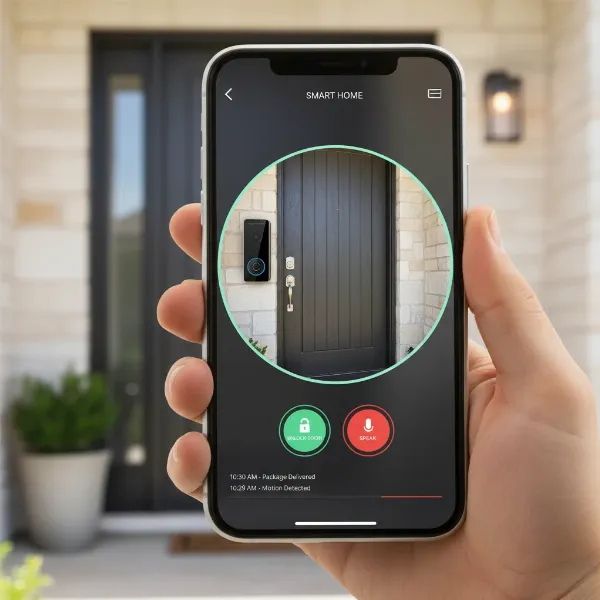
The modern home is increasingly interconnected, and at its forefront stands a device transforming how we interact with our doorstep: the video doorbell. This smart security solution offers far more than just a chime, providing real-time awareness and an added layer of protection for your property. For many, a video doorbell is now an essential component of a comprehensive home security system, offering peace of mind whether you’re at home or thousands of miles away. But with a multitude of options available, each boasting unique features and functionalities, navigating the market can be challenging. This comprehensive guide will equip you with the knowledge needed to make an informed decision, helping you choose the perfect video doorbell to safeguard your home and streamline your daily life.
What is a Video Doorbell?
A video doorbell is a smart device equipped with a camera, microphone, and speaker, designed to replace a traditional doorbell. When someone approaches your door or presses the button, it sends alerts and streams live video directly to your smartphone or other connected devices. This allows you to see, hear, and speak to visitors from anywhere, even if you’re not physically home.
The main components of a video doorbell typically include a high-definition camera with a wide field of view, often enhanced with night vision for clear visibility in low-light conditions. Two-way audio enables direct communication with visitors, while motion sensors detect activity at your doorstep, triggering recordings and instant notifications. Many models also integrate with smart home ecosystems like Amazon Alexa or Google Assistant, allowing for voice control and seamless automation. The evolution of video doorbells has been rapid, moving from basic live feeds to sophisticated devices featuring artificial intelligence for advanced motion detection, package alerts, and even facial recognition.
Why Use a Video Doorbell?
Implementing a video doorbell offers a significant upgrade to home security and daily convenience, addressing a range of modern challenges. From deterring potential intruders to simply knowing when a package has arrived, the benefits extend beyond a traditional doorbell’s capabilities.
Primarily, a video doorbell substantially enhances home security. It acts as a visual deterrent to potential burglars and package thieves, who are less likely to target a home they know is under surveillance. In the event of an incident, the device records crucial evidence, providing video and audio footage that can be invaluable for identification and police investigations. Furthermore, it offers peace of mind by allowing you to monitor your entryway remotely, receiving instant alerts for any detected motion or a doorbell press.
Beyond security, video doorbells provide unparalleled convenience. You can screen visitors from anywhere, whether you’re at work, on vacation, or simply in another room. This means no more missing important deliveries or wondering who was at your door while you were out. For families, it offers an easy way to communicate with children arriving home or to keep an eye on elderly relatives. They effectively extend your presence to your doorstep, making your home smarter and safer.
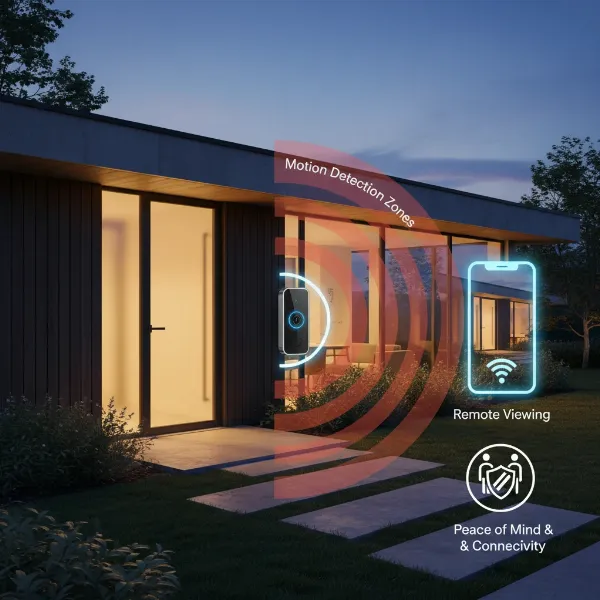 Overview of a modern home protected by a smart video doorbell, emphasizing security and convenience benefits.
Popular Video Doorbell Types on the Market
When exploring video doorbells, you’ll primarily encounter two main categories: wired and wireless models. Each offers distinct advantages and disadvantages, making them suitable for different home setups and user preferences. Understanding these differences is crucial for selecting the right device for your specific needs.
Wired Video Doorbells
Wired video doorbells connect directly to your home’s existing doorbell wiring, drawing continuous power from your electrical system. This constant power supply is their primary advantage, ensuring uninterrupted operation without the need for battery recharges.
Pros:
- Consistent Power Supply: No batteries to charge or replace, leading to reliable, continuous operation.
- Enhanced Features: Often support more advanced features like continuous video recording (CVR), higher resolution footage, and sophisticated motion detection, as they are not constrained by battery life.
- Stable Connection: Typically offer a more stable and reliable connection, reducing lag and signal interruptions.
- Integration: Seamlessly integrate with existing chime systems and smart home hubs.
Cons:
- Complex Installation: Requires existing doorbell wiring and can be more difficult to install, potentially needing professional help.
- Less Flexibility: Placement is limited to the location of existing wiring.
|
Our Picks for the Best Video doorbell in 2026
As an Amazon Associate I earn from qualifying purchases.
|
||
| Num | Product | Action |
|---|---|---|
| 1 | youkey Dual Camera Wireless Video Doorbell — Head-to-Toe View, 2K FHD Battery Doorbell with Local Storage No Monthly Fee, Package Detection, 5Ghz WiFi, Works with Alexa & Google Assistant, DB312 |

|
| 2 | Ring Battery Doorbell, Home or business security with Head-to-Toe video, Live View with Two-Way Talk, and Motion Detection & Alerts, Venetian Bronze |
|
| 3 | Orbitell 1080p Wireless Wi-Fi Video Doorbell Camera with Two Way Audio, Night Vision, Cloud Storage, Smart AI Motion Detection, Support 2.4GHz Wi-Fi only |
|
| 4 | Blink Video Doorbell (newest model) – Head-to-toe HD view, two-year battery life, and simple setup. Required Sync Module not included – Add-On (Black) |
|
| 5 | Ring Battery Doorbell, Home or business security with Head-to-Toe video, Live View with Two-Way Talk, and Motion Detection & Alerts, Satin Nickel |
|
| 6 | Ring Video Wired Doorbell (newest model), Home or business security, Two-Way Talk, advanced motion detection, HD camera and real-time alerts to monitor your front door (wiring required) |
|
| 7 | eufy Security Video Doorbell, No Subscription, Dual Cameras, 2K FHD,Head-to-Toe View, Doorbell Camera Wireless & Wired, Color Night Vision, Two-Way Talk, AI Motion/Package Detection, Built-in 8GB |
|
| 8 | Tapo 2K Wireless Smart Video Doorbell with Chime - 160° Ultra-Wide View,Person Detection, Ring Call, 2-Way Audio, Subscription-Free Local Storage/Optional Cloud, Motion Only Alert, D210 |
|
| 9 | Blink Video Doorbell (newest model) – Head-to-toe HD view, two-year battery life, and simple setup. Sync Module Core included – System (Black) |
|
| 10 | Arlo Video Doorbell 2K (2nd Gen, Latest Release), Wireless or Wired Option, 2-Way Audio, Night Vision, Head to Toe Video View, Package Detection, Person & Vehicle Recognition, 1-Month Secure Plan |
|
Wireless Video Doorbells
Wireless video doorbells are battery-powered and connect to your home’s Wi-Fi network. Their portability and ease of installation make them a popular choice, especially for renters or homes without existing doorbell wiring.
Pros:
- Easy Installation: No wiring required, allowing for quick and straightforward DIY installation.
- Flexible Placement: Can be installed almost anywhere within Wi-Fi range.
- Portability: Ideal for renters or those who may want to move the doorbell to a different location.
Cons:
- Battery Management: Requires periodic recharging or battery replacement, which can lead to downtime.
- Reliance on Wi-Fi: Performance can be affected by Wi-Fi strength and stability.
- Limited Advanced Features: Some advanced features like continuous recording might be limited to conserve battery life.
Classification by Features
Beyond connectivity, video doorbells differentiate themselves through a range of advanced features:
- Video Recording: All video doorbells record footage, but resolution varies (1080p, 2K, 4K) as does the field of view (often 150-180 degrees, sometimes with a 1:1 aspect ratio to see packages).
- Two-Way Audio: Allows you to speak with visitors through the doorbell and hear their responses.
- Motion Detection: Essential for security, alerting you to activity. Advanced systems can differentiate between people, animals, and vehicles, reducing false alarms.
- Night Vision: Crucial for visibility after dark, with options for infrared or color night vision.
- AI Integration: Many newer models incorporate AI for intelligent alerts such as person detection, package detection, and even facial recognition, providing more specific and actionable notifications.
Comparing Top Video Doorbell Brands
The video doorbell market is dominated by several key players, each offering a unique ecosystem and feature set. Understanding the strengths and weaknesses of popular brands like Ring, Nest, Arlo, Eufy, and Blink can help narrow down your choices.
Here’s a detailed comparison of prominent video doorbell brands:
| Feature/Brand | Ring | Nest (Google) | Arlo | Eufy | Blink |
|---|---|---|---|---|---|
| Power | Wired & Battery options | Wired & Battery options | Mostly Battery (Wire-Free) | Wired & Battery options | Mostly Battery (AA Lithium) |
| Resolution | 1080p, 1536p, up to 4K (Pro 2) | 1080p, 2K HDR (wired) | 1536×1536, 2K, 4K | 2K, Dual Cam options | 1080p |
| Field of View | 155-180 degrees (vertical & horizontal) | 160 degrees, 3:4 aspect ratio (head-to-toe) | 180 degrees (square view) | 160 degrees (Dual Cam has second downward camera) | 135 degrees horizontal, 80 degrees vertical |
| Night Vision | Infrared, Color Night Vision on some models | HDR, high-quality night vision | Infrared, Color Night Vision | Color Night Vision, infrared LEDs | Infrared |
| AI Features | 3D Motion Detection, Person Detection, Package Detection | Person, Package, Familiar Faces detection | Person, Vehicle, Animal detection | Person, Package, Vehicle, Animal detection, Human/Face recognition | Basic motion alerts |
| Storage | Cloud storage (Ring Protect subscription) | Cloud storage (Nest Aware subscription) | Cloud (subscription) or local (HomeBase) | Local storage (HomeBase, built-in storage on some models), Cloud | Cloud (subscription) or local (Sync Module 2) |
| Subscription | Required for video history, advanced alerts, rich notifications | Required for most intelligent alerts, extended video history | Optional for cloud storage, advanced features | Optional for cloud storage; many features subscription-free | Optional for cloud storage, additional features |
| Ecosystem | Amazon Alexa, Ring ecosystem | Google Assistant, Google Home ecosystem | Amazon Alexa, Google Assistant | Amazon Alexa, Google Assistant, HomeKit (with HomeBase) | Amazon Alexa, Blink ecosystem |
| Price Range | Mid-range to Premium | Premium | Mid-range to Premium | Mid-range | Budget-friendly |
| Key Differentiator | Broad range of products, robust security integration, user-friendly app | Excellent video quality, smart AI detection, deep Google integration | High-resolution video, robust build, integration with Arlo cameras | Subscription-free local storage, dual-cam for package detection | Most affordable, long battery life, simple |
This table highlights that while all brands offer core video doorbell functionalities, they differ significantly in their pricing, reliance on subscriptions, and integration with broader smart home ecosystems. For instance, Eufy stands out for its emphasis on local storage and subscription-free operation, appealing to budget-conscious users seeking privacy without recurring fees. Conversely, Google Nest is often lauded for its superior AI detection and video quality, though it typically comes with a higher price tag and subscription reliance for advanced features. Ring offers a wide array of options within the Amazon ecosystem, known for its extensive range and integrations.
How to Choose the Right Video Doorbell
Selecting the ideal video doorbell involves more than just picking a popular brand; it requires a thoughtful assessment of your specific needs, budget, and home environment. A well-chosen device will seamlessly integrate into your lifestyle, enhancing security and convenience without unnecessary complications.
1. Determine Your Needs:
Start by evaluating why you want a video doorbell. Are you primarily concerned with deterring package thieves, monitoring visitors, or having evidence in case of a security incident? Do you need advanced features like facial recognition or just basic motion alerts? Understanding your primary motivation will guide your feature requirements.
2. Set Your Budget:
Video doorbells range from budget-friendly options to premium models with all the bells and whistles. Remember to factor in not only the initial purchase price but also potential ongoing costs for cloud storage subscriptions, which can significantly add to the long-term expense. Some brands like Eufy offer robust subscription-free options with local storage.
3. Essential Features to Consider:
- Video Quality: Look for at least 1080p HD resolution. Higher resolutions (2K, 4K) offer clearer details. A wide field of view (160-180 degrees) is important, and a 1:1 aspect ratio can be beneficial for seeing packages directly below the doorbell.
- Night Vision: Both infrared and color night vision are available. Color night vision can provide more detail, but infrared is generally effective.
- Two-Way Audio: Ensure clear audio quality for effective communication with visitors.
- Motion Detection: Advanced motion detection that distinguishes between people, animals, and vehicles reduces false alarms. Features like “person detection” and “package detection” are highly valuable.
- Power Source: Decide between wired (constant power, reliable) and wireless (easy installation, battery maintenance).
- Storage Options: Cloud storage offers accessibility from anywhere but often requires a subscription. Local storage (via an SD card or a home base) provides subscription-free video history.
- Smart Home Integration: If you have an existing smart home system (Alexa, Google Assistant, Apple HomeKit), choose a doorbell that integrates seamlessly with it for a unified experience.
4. Brand Reputation and Support:
Research brands known for reliability, good customer service, and regular software updates. Read reviews from multiple sources to get a balanced perspective on product performance and user satisfaction.
5. Warranty and Return Policy:
Check the manufacturer’s warranty and the retailer’s return policy. A solid warranty indicates confidence in the product’s durability.
By carefully considering these factors, you can confidently select a video doorbell that not only meets your security needs but also provides an intuitive and reliable user experience.
Video Doorbell Installation and Usage Guide
Installing and getting started with your new video doorbell doesn’t have to be a daunting task. While wired models require a bit more attention to electrical connections, most modern video doorbells are designed for relatively straightforward installation.
Basic Installation Steps
For Wired Video Doorbells:
- Safety First: Locate your home’s circuit breaker box and turn off the power to your existing doorbell. Use a voltage tester to confirm the power is off before proceeding.
- Remove Old Doorbell: Unscrew and gently remove your old doorbell unit, exposing the existing wires.
- Mounting Bracket: Position the new doorbell’s mounting bracket over the existing hole. Use a level to ensure it’s straight, then mark and drill any necessary holes for secure attachment. Insert wall anchors if your surface requires them.
- Connect Wires: Carefully connect the existing doorbell wires to the terminals on your new video doorbell, following the manufacturer’s specific instructions. Ensure connections are tight and secure.
- Attach Doorbell: Secure the video doorbell unit to its mounting bracket.
- Restore Power & Setup: Turn the power back on at the circuit breaker. Follow the in-app instructions to connect your doorbell to your home’s Wi-Fi network and complete the initial setup. This usually involves scanning a QR code or entering network details.
For Wireless (Battery-Powered) Video Doorbells:
- Charge Battery: Fully charge the doorbell’s battery before installation. This can take several hours.
- Download App & Connect: Download the companion app and begin the setup process. It’s often easier to connect the doorbell to your Wi-Fi network and complete initial configuration steps before mounting it to the wall, as some setups may require scanning a QR code on the device itself.
- Choose Location: Select an optimal mounting location for clear viewing, typically around 4 feet (1.2 meters) from the ground, ensuring it’s within range of your Wi-Fi.
- Mounting Bracket: Mark and drill holes for the mounting bracket. Attach the bracket securely to the wall with the provided screws and anchors.
- Attach Doorbell: Align the doorbell with the bracket and snap or screw it into place. Secure it with any provided security screws.
- Finalize Setup: Complete any remaining in-app configuration, such as setting motion detection zones and notification preferences.
Using Your Video Doorbell
Once installed, using your video doorbell is typically intuitive:
- Live View: Access a live video feed of your doorstep through the app at any time.
- Two-Way Talk: Use the microphone and speaker in the app to speak with visitors.
- Notifications: Receive instant alerts on your phone for motion detection or a doorbell press.
- Video History: Review recorded footage, usually stored in the cloud (with subscription) or locally.
- Customization: Adjust motion sensitivity, set privacy zones, and customize notification settings to suit your preferences.
Troubleshooting Common Issues
- No Power/Not Turning On: For wired doorbells, check the circuit breaker and wire connections. For wireless, ensure the battery is charged.
- Wi-Fi Connectivity Problems: Ensure your doorbell is within Wi-Fi range. Try restarting your router or the doorbell.
- Poor Video Quality: Check for obstructions on the camera lens. Ensure strong Wi-Fi signal. Higher resolution settings might require better bandwidth.
- False Motion Alerts: Adjust motion sensitivity settings or set up specific activity zones within the app to ignore irrelevant areas.
Important Considerations for Video Doorbell Use
While video doorbells offer significant advantages, it’s crucial to be aware of certain considerations, particularly regarding privacy and legal aspects, as well as maintaining your device.
Privacy and Legal Compliance
The use of video doorbells can raise privacy concerns, especially regarding the recording of public spaces or neighboring properties.
- Expectation of Privacy: Generally, there is no reasonable expectation of privacy in public areas like sidewalks or streets. However, filming into a neighbor’s private property (e.g., their windows or backyard) can lead to legal issues. Position your camera to primarily focus on your own property and immediate entryway.
- Audio Recording Laws: Laws regarding audio recording vary by region. Some states require “two-party consent,” meaning all parties involved in a conversation must consent to being recorded. If your doorbell records audio, ensure you understand and comply with local laws. In many cases, recording conversations between you and a visitor is permissible because you are one of the parties consenting.
- Neighbor Disputes: Video doorbells can sometimes worsen neighborly relationships if they feel their privacy is being invaded. Adjust camera angles to minimize surveillance of their property and communicate openly if concerns arise.
- Data Security: Your video doorbell collects personal data. Choose brands with strong encryption and security protocols to protect your footage and personal information from potential hacks or leaks. Use strong, unique passwords for your doorbell accounts.
Maintenance and Care
To ensure optimal performance and longevity, a video doorbell requires some basic maintenance:
- Regular Cleaning: Periodically clean the camera lens and housing to remove dust, dirt, or spiderwebs that can obscure the view.
- Firmware Updates: Keep your device’s firmware updated. Manufacturers frequently release updates that improve performance, add features, and patch security vulnerabilities.
- Battery Management (Wireless): For battery-powered models, monitor battery life and recharge promptly to avoid downtime. Consider a spare battery for quick swaps.
- Wiring Checks (Wired): Occasionally check the wiring connections for any signs of corrosion or looseness, especially if you experience intermittent power issues.
By being mindful of these considerations, you can maximize the benefits of your video doorbell while respecting privacy and ensuring its reliable operation for years to come.
“A video doorbell isn’t just a gadget; it’s an active participant in your home’s defense, offering eyes and ears where you can’t always be. The key is to select one that fits your lifestyle, not just your budget.” – Alex Chen, Smart Home Security Expert
Conclusion
Choosing the right video doorbell is a significant step towards a smarter, more secure home. We’ve explored the diverse landscape of these intelligent devices, from the fundamental differences between wired and wireless options to the advanced features that set leading brands apart. By considering your specific security needs, budget, and desired integrations, you can confidently select a video doorbell that offers unparalleled peace of mind and convenience.
Whether you prioritize subscription-free local storage, cutting-edge AI detection, or seamless integration with your existing smart home ecosystem, there’s a video doorbell designed for you. Remember to weigh the benefits of reliable, continuous power against the flexibility of battery-powered installation, and always be mindful of privacy considerations in your local area. With the right video doorbell, your front door becomes a hub of information, offering real-time alerts and a virtual presence that keeps you connected and secure.
Are you ready to transform your entryway and bring the future of home security to your doorstep?
Frequently Asked Questions
What’s the main difference between wired and wireless video doorbells?
Wired video doorbells connect to your home’s existing electrical wiring for continuous power, ensuring constant operation and often enabling more advanced features. Wireless models are battery-powered, offering easier installation and flexible placement, but require periodic recharging.
Do I need a subscription for my video doorbell?
Not always, but often. Many video doorbells offer basic functionalities without a subscription, such as live view and instant alerts. However, most brands require a paid subscription for cloud video storage, advanced AI features like person or package detection, and extended video history. Some brands like Eufy offer robust subscription-free options with local storage.
How high should I install my video doorbell?
The optimal height for a video doorbell is typically around 4 feet (1.2 meters) from the ground. This height usually provides a clear view of visitors’ faces and allows the camera to capture packages left on your doorstep, without being too high or too low.
Can video doorbells record all the time?
Wired video doorbells can often support continuous video recording (CVR) due to their constant power supply. Battery-powered wireless models, however, usually record only when motion is detected or the doorbell is pressed, to conserve battery life.
Are video doorbells legal, and what about privacy?
Yes, video doorbells are generally legal. However, laws vary by region, particularly concerning audio recording and filming public spaces or neighboring properties. It’s advisable to position your camera to focus primarily on your own property and understand local laws regarding recording consent and privacy expectations.
What smart home systems do video doorbells integrate with?
Most popular video doorbells integrate with major smart home ecosystems such as Amazon Alexa and Google Assistant, allowing for voice control, live feed viewing on smart displays, and integration into broader home automation routines. Some also offer compatibility with Apple HomeKit.