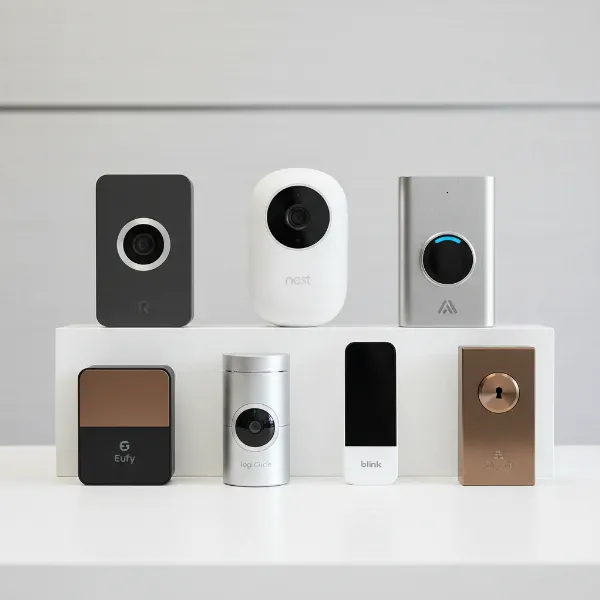
In today’s fast-paced world, ensuring the security and convenience of your home is paramount, even more so when living in an apartment. A video doorbell, a device that combines a traditional doorbell with a video camera, two-way audio, and often motion detection, offers an innovative solution to modern security challenges. For apartment dwellers, choosing the right video doorbell involves navigating unique considerations, from landlord restrictions to shared spaces and installation limitations. This comprehensive guide will walk you through everything you need to know, helping you select a video doorbell that perfectly fits your lifestyle, budget, and apartment living requirements.
What is a Video Doorbell?
A video doorbell is a smart home device that fundamentally reimagines the traditional doorbell. At its core, it’s a security camera integrated into a doorbell button, providing a live video feed of your doorstep directly to your smartphone or other connected devices. When someone presses the doorbell or triggers its motion sensor, you receive an instant alert, allowing you to see and speak to visitors, even when you’re not home.
The main components of a video doorbell system typically include a high-definition camera with night vision, a microphone, a speaker for two-way audio, a motion sensor, and Wi-Fi connectivity. Some models also feature local storage or cloud subscription options for recording footage. Historically, doorbells were simple electromechanical devices. The evolution into video doorbells began with basic intercom systems and has rapidly advanced with the advent of smart home technology, integrating AI for person detection and seamless connectivity with other smart devices.
Why Should You Use a Video Doorbell in an Apartment?
Using a video doorbell in an apartment offers a host of benefits that significantly enhance both security and convenience, addressing many of the unique challenges associated with multi-unit living. These devices empower residents with greater control and awareness over their personal space.
One of the primary advantages is increased home security. In an apartment building, where multiple individuals may access common areas, a video doorbell provides an essential layer of protection by allowing you to screen visitors before opening your door. This is particularly valuable in buildings without a concierge or a sophisticated entry system, giving you peace of mind by clearly identifying who is at your entrance. Additionally, these devices are invaluable for package management. With the rise of online shopping, porch piracy is a growing concern. A video doorbell enables you to monitor deliveries in real-time and even communicate with couriers, ensuring your packages are left in a secure location or rescheduled if you’re unavailable.
Beyond security, video doorbells offer remarkable convenience. You can answer your door from anywhere, whether you’re at work, on vacation, or simply in another room. This means never missing an important visitor or a crucial delivery. They also provide recorded evidence in case of incidents, such as suspicious activity or disputes, which can be critical for both personal safety and for communicating with building management or law enforcement.
“For apartment residents, a video doorbell transforms a passive entryway into an active security checkpoint, offering control and visibility that traditional peepholes simply can’t match.” – Dr. Anya Sharma, Smart Home Security Analyst
Popular Video Doorbell Types on the Market
The market for video doorbells is diverse, offering various types categorized by their connection methods and the array of features they provide. Understanding these distinctions is crucial for selecting a model that aligns with apartment living constraints.
Video doorbells primarily fall into two categories based on their power and connectivity: wired and wireless.
- Wired Video Doorbells: These devices typically connect to your existing doorbell wiring and often require a transformer for power. They offer continuous power, eliminating the need for battery changes, and often provide a more stable connection and richer feature set, including continuous recording.
- Pros: Reliable power, consistent performance, often higher-end features.
- Cons: Requires existing wiring, may necessitate electrical work, often not renter-friendly due to permanent installation.
- Wireless Video Doorbells: These are usually battery-powered, offering significant flexibility in installation as they don’t require existing wiring. They connect to your home’s Wi-Fi for data transmission. Some wireless options are designed to replace an existing peephole, making them ideal for renters who cannot modify their door.
- Pros: Easy, non-permanent installation (often no-drill), highly portable, ideal for renters.
- Cons: Battery charging/replacement, potential for intermittent connectivity, some advanced features may require more power.
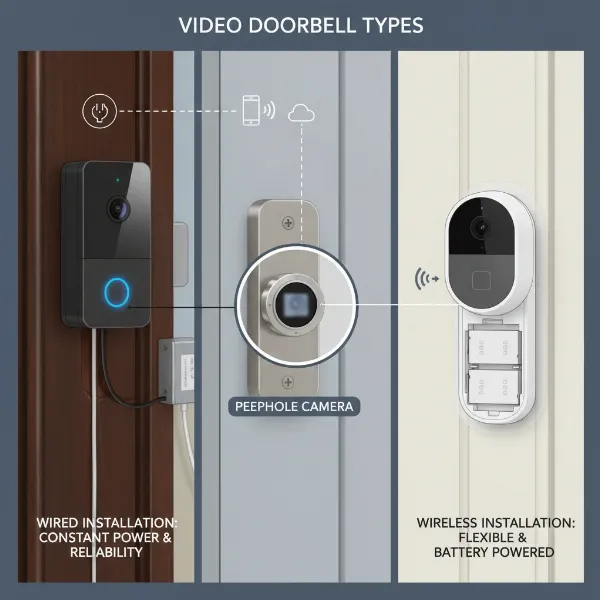 Various types of video doorbells including wired and wireless models suitable for apartment living
Beyond connectivity, video doorbells are also differentiated by their features:
- Basic Recording and Two-Way Talk: Most models offer standard high-definition video recording (1080p or higher) and the ability to speak with visitors through your smartphone.
- Motion Detection: A fundamental security feature, alerting you to activity near your door even if the doorbell isn’t pressed. Advanced systems allow for customizable motion zones to reduce false alarms.
- AI Integration (Person/Package Detection): More sophisticated doorbells utilize AI to differentiate between people, animals, and packages, sending more relevant alerts and minimizing unnecessary notifications.
- Night Vision: Essential for clear video footage in low-light conditions, typically infrared or color night vision.
- Field of View: The angle at which the camera can capture footage. Wider fields of view (e.g., 160-180 degrees) are beneficial for covering more of your doorstep and immediate surroundings.
- Cloud vs. Local Storage: Footage can be stored in the cloud (often requiring a subscription) or locally on an SD card or hub. Local storage avoids recurring fees but may have capacity limits.
For apartment dwellers, battery-powered wireless models and peephole cameras are generally the most suitable choices due to their non-invasive installation.
Comparing Popular Video Doorbell Brands
The video doorbell market is dominated by several key players, each offering a range of models with distinct features and ecosystems. When choosing for an apartment, comparing these brands based on price, features, durability, and support is vital.
| Brand | Key Features for Apartments | Price Range (Approx.) | Pros | Cons |
|---|---|---|---|---|
| Ring | Wide range of wired/wireless, battery-powered, peephole camera, extensive ecosystem. | $60 – $250+ | Many battery options, easy DIY installation, good smart home integration (Alexa), strong community. | Subscription often required for video history, privacy concerns raised by some users. |
| Google Nest | Battery-powered options, excellent AI (person/package detection), sleek design, deep Google Home integration. | $100 – $280+ | Superior AI detection, high-quality video, seamless Google ecosystem integration. | Higher price point, full features often tied to Nest Aware subscription, limited local storage. |
| Arlo | Wireless focus, long battery life, high resolution (2K-4K), local storage options via hub. | $100 – $200+ | Strong battery performance, sharp video, no subscription needed for basic features. | Can be bulkier, hub required for local storage, subscription for advanced features. |
| Eufy | Battery-powered, 2K HD video, local storage (no subscription), AI detection, durable builds. | $80 – $200+ | No mandatory subscription for video storage, good value, long battery life, good privacy. | Fewer integrations with third-party smart home platforms compared to Ring/Nest. |
| Blink | Highly affordable, battery-powered, long battery life, Amazon integration, basic features. | $40 – $100+ | Very budget-friendly, simple setup, excellent battery longevity, works with Alexa. | More basic features, lower video resolution in some models, sync module often required. |
For apartment dwellers, brands like Ring and Eufy offer strong battery-powered and no-drill options that are highly flexible. Google Nest provides advanced AI features but often at a higher cost and with subscription dependency. Arlo offers robust wireless performance with local storage, while Blink is an excellent budget-friendly choice. When making your decision, consider your existing smart home ecosystem and whether you prefer to avoid monthly subscription fees.
Guide to Choosing the Right Video Doorbell for Your Apartment
Selecting the ideal video doorbell for an apartment involves a methodical approach, taking into account your specific living situation, financial plan, and desired functionalities. It’s more than just picking a gadget; it’s about finding a solution that integrates seamlessly into your apartment life.
To make an informed decision, consider these crucial factors:
-
Understand Your Rental Agreement and Landlord Rules: This is the most critical first step for any renter. Many apartment complexes have strict rules against drilling holes, altering exterior fixtures, or installing permanent devices. Carefully review your lease or speak directly with property management. Look for clauses related to “modifications,” “external installations,” or “security devices.” If drilling is prohibited, battery-powered, peephole, or adhesive-mounted options are your best bet.
-
Determine Your Budget: Video doorbells range widely in price, from under $50 to over $250. Factor in not just the upfront cost of the device, but also potential ongoing expenses like cloud storage subscriptions, which can add up over time. Decide if you prefer a one-time purchase or if the benefits of a subscription service (e.g., extended video history, advanced AI features) outweigh the recurring cost.
-
Identify Essential Features:
- Power Source: For apartments, battery-powered is often ideal for its easy, non-invasive installation. Check battery life and ease of recharging. If you have an existing wired doorbell and permission to use it, a hardwired option offers continuous power.
- Installation Method: Prioritize no-drill options like peephole cameras or adhesive mounts. If your apartment has an existing wired doorbell that you’re allowed to use, consider a wired replacement for consistent power.
- Video Quality and Field of View: Look for at least 1080p HD resolution for clear images. A wide field of view (160-180 degrees) is beneficial to capture more of your entryway.
- Motion Detection and Zones: Essential for alerts. Customizable motion zones help reduce false alarms from passersby in shared hallways, which is crucial in apartment settings.
- Two-Way Audio: Allows you to speak with visitors. Ensure clear audio quality.
- Night Vision: Infrared or color night vision is vital for security after dark.
- Smart Home Integration: If you have other smart devices (Alexa, Google Home), choose a doorbell compatible with your existing ecosystem for a unified smart home experience.
- Storage Options: Decide between local storage (SD card, hub) to avoid subscriptions or cloud storage for convenient remote access and backup.
-
Research Reputable Brands and Read Reviews: Stick to well-known brands like Ring, Nest, Eufy, and Arlo. Look for reviews from other apartment dwellers or renters to see how specific models perform in similar environments. Pay attention to comments regarding battery life, app performance, Wi-Fi connectivity, and customer support.
-
Consider Privacy: In apartment hallways, your camera might capture neighbors’ activities. Be mindful of privacy regulations and ethical considerations. Choose models with adjustable motion zones to focus only on your immediate doorway. It’s also a good idea to inform neighbors about your doorbell camera.
By systematically evaluating these aspects, you can confidently select a video doorbell that provides optimal security and convenience for your apartment without violating rental rules or inconveniencing neighbors.
Installation and Usage Guide for Your Apartment Video Doorbell
Installing and using a video doorbell in an apartment requires a slightly different approach than in a standalone house, primarily due to rental restrictions and shared building environments. Here’s a step-by-step guide to get you started and ensure smooth operation.
Basic Installation Steps
- Check Your Lease (Again!): Before doing anything, confirm that your landlord permits video doorbell installation, especially if it involves any permanent modifications. Most apartment-friendly options require no drilling.
- Charge the Battery (if wireless): If you have a battery-powered model, fully charge the battery pack before installation. This can take several hours.
- Download the Companion App: Install the manufacturer’s app on your smartphone. This app will guide you through the setup process and allow you to control your doorbell.
- Mount the Device:
- For Peephole Cameras: Simply remove your existing peephole using the provided tool, insert the camera unit, and secure it from the inside. Retain your original peephole for easy removal when you move.
- For Adhesive-Backed Models: Clean the area around your doorframe. Peel off the adhesive backing and firmly press the doorbell onto the desired spot. Ensure it’s level and provides a good view.
- For Wired Doorbells (with landlord permission): Turn off power to your existing doorbell at the breaker. Disconnect the old doorbell, then connect the new video doorbell wires according to the manufacturer’s instructions. Secure it to the wall. Restore power.
Our Picks for the Best Video doorbell in 2026As an Amazon Associate I earn from qualifying purchases.Num Product Action 1 Ring Battery Doorbell with Ring Indoor Cam 2nd Gen (White) 
2 All-new Blink Video Doorbell + Outdoor 4 – Wireless smart security cameras, head-to-toe HD view, two-year battery life. Sync Module Core included – 1 camera system + Video Doorbell
3 Ring Battery Doorbell (newest model), Home or business security with Head-to-Toe video, Live View with Two-Way Talk, and Motion Detection & Alerts, Venetian Bronze
4 Blink Outdoor 4 XR – two-year battery wireless camera with 4x security coverage, 1000 ft open-air range or 400 ft with typical use — 2 camera system
5 Blink Video Doorbell (newest model) – Head-to-toe HD view, two-year battery life, and simple setup. Required Sync Module not included – Add-On (Black)
6 Blink Video Doorbell (newest model) – Head-to-toe HD view, two-year battery life, and simple setup. Sync Module Core included – System (Black)
7 Ring Battery Doorbell with Ring Indoor Cam 2nd Gen (Black)
8 Ring Battery Doorbell (newest model), Home or business security with Head-to-Toe video, Live View with Two-Way Talk, and Motion Detection & Alerts, Satin Nickel
9 Blink Video Doorbell (newest model) – Head-to-toe HD view, two-year battery life, and simple setup. Required Sync Module not included – Add-On (White)
10 Blink Mini 2K+ (newest model), Rental-Friendly Home & Security Camera with 2K video resolution, enhanced audio, motion detection, easy setup, 1 camera (Black)
- Connect to Wi-Fi: Follow the in-app instructions to connect your video doorbell to your apartment’s Wi-Fi network. Ensure a strong signal at your door; you might need a Wi-Fi extender if the signal is weak.
- Test the Device: Press the doorbell button, trigger the motion sensor, and test the two-way audio to ensure everything is working correctly.
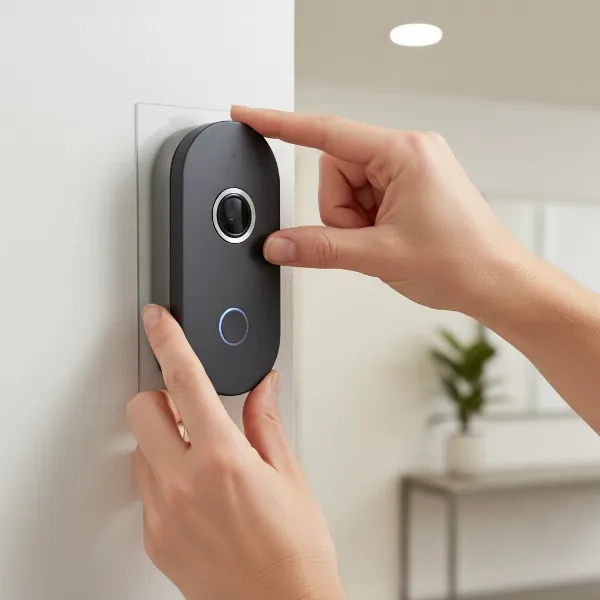 A person installing a battery-powered video doorbell on an apartment door frame
Using Your Video Doorbell’s Features
- Live View: Use the app to check your doorstep anytime for a live video feed.
- Motion Alerts: Customize motion detection sensitivity and zones within the app to avoid excessive notifications from hallway traffic. Focus the detection zone primarily on your door and immediate entrance.
- Two-Way Talk: When you receive an alert, tap to answer and speak with your visitor through the app.
- Video Playback: Access recorded footage (if you have local storage or a subscription) to review past events.
- Notifications: Set up notifications for doorbell presses, motion detection, and low battery alerts.
Troubleshooting Common Issues
- Weak Wi-Fi Signal: If you experience dropped connections or laggy video, consider moving your Wi-Fi router closer or investing in a Wi-Fi extender.
- Battery Drain: If your battery drains quickly, reduce motion sensitivity, decrease video quality, or shorten recording times in the app settings. Ensure the battery is fully charged.
- False Alarms: Adjust motion zones and sensitivity settings. Enable person-only detection if your model offers it.
- Audio Issues: Ensure your phone’s volume is up and there’s no interference. Check the doorbell’s microphone and speaker for obstructions.
Important Considerations When Using a Video Doorbell in an Apartment
While video doorbells offer significant advantages, their use in an apartment setting comes with specific ethical, legal, and practical considerations that every resident should be aware of. Navigating these aspects thoughtfully ensures you benefit from the technology without creating issues for yourself or your neighbors.
Personal Information Security
Your video doorbell captures sensitive footage of your entryway. It’s crucial to understand how this data is stored and who has access to it.
- Data Storage: If using cloud storage, understand the provider’s security protocols and privacy policy. Opt for strong, unique passwords for your doorbell’s account.
- Account Security: Enable two-factor authentication (2FA) on your video doorbell account to protect against unauthorized access.
- Shared Access: If multiple family members need access to the doorbell feed, ensure they also follow strong security practices.
Legal and Privacy Regulations
The issue of privacy is particularly complex in shared living spaces like apartments.
- Landlord/HOA Rules: Beyond installation, some apartment complexes may have rules regarding video recording in common areas. Always clarify these with your property manager.
- Neighbor Privacy: Your doorbell camera’s field of view might extend into a neighbor’s doorway or a common hallway. In many jurisdictions, recording public spaces or areas where there’s no reasonable expectation of privacy is generally allowed. However, continuously recording a direct view into a neighbor’s private space could raise privacy concerns.
- Best Practice: To mitigate privacy issues, use the customizable motion detection zones to limit recording primarily to your immediate doorway. It’s also considered good etiquette to inform your immediate neighbors about your video doorbell and explain its purpose (e.g., package security).
Maintenance and Device Care
Proper maintenance ensures your video doorbell functions reliably and lasts longer.
- Battery Management: For wireless models, establish a regular schedule for checking and recharging batteries. Keep a spare charged battery if possible.
- Cleaning: Periodically wipe the camera lens and surrounding casing with a soft, damp cloth to remove dust, smudges, and cobwebs. This ensures clear video quality. Avoid harsh chemicals.
- Software Updates: Keep the doorbell’s firmware and companion app updated to benefit from the latest features, security patches, and performance improvements.
- Weather Protection: While many doorbells are weather-resistant, consider additional protection (like a small overhang or cover) if your apartment door is directly exposed to harsh weather conditions.
By being proactive about these considerations, apartment dwellers can maximize the security and convenience of their video doorbell while maintaining good relations with neighbors and adhering to building regulations.
Conclusion
Choosing the right video doorbell for your apartment is a smart investment in enhancing your personal security and convenience. We’ve explored the diverse range of options, highlighted key features tailored for apartment living, and compared popular brands to help you navigate the market. From understanding rental restrictions and prioritizing non-invasive installation methods to ensuring privacy and maintaining your device, each step is crucial for a successful integration into your apartment home. The ideal video doorbell for you will be one that respects your building’s rules, fits your budget, and provides the essential features for your peace of mind.
By considering factors like power source, video quality, motion detection, and smart home compatibility, you can find a device that acts as your vigilant doorman, whether you’re at home or away. Are you ready to take the first step towards a more secure and connected apartment living experience?
Frequently Asked Questions
Can I install a video doorbell in a rented apartment without landlord permission?
It is strongly recommended to check your lease agreement and obtain landlord permission before installing any video doorbell, especially if it requires drilling or permanent modifications. Many battery-powered or peephole camera models offer non-invasive installation options that are often permissible.
What are the best video doorbell options for apartments that don’t allow drilling?
For apartments with strict no-drilling policies, battery-powered video doorbells with adhesive mounts or models designed to replace an existing peephole are excellent choices. Brands like Ring (Peephole Cam) and many Eufy and Arlo wireless models offer these renter-friendly solutions.
Do I need a subscription for an apartment video doorbell?
Not always. While many brands offer cloud storage subscriptions for extended video history and advanced features, some video doorbells (e.g., Eufy, Arlo with a hub) provide local storage options, allowing you to avoid recurring monthly fees for video recordings.
How do I address privacy concerns with neighbors in an apartment building?
To respect neighbor privacy, choose a video doorbell with customizable motion detection zones, allowing you to focus recording only on your immediate doorway. It’s also good practice to inform your neighbors about your doorbell camera and explain its security benefits for the shared hallway.
What if my apartment’s Wi-Fi signal is weak at the front door?
A weak Wi-Fi signal can affect Video Doorbell performance. Consider repositioning your Wi-Fi router if possible, or invest in a Wi-Fi extender to boost the signal strength at your apartment door, ensuring a reliable connection for your device.