In today’s interconnected world, safeguarding our homes and loved ones has become a paramount concern. With an array of smart devices available, choosing the right security solution can feel overwhelming. Two prominent contenders in the realm of home surveillance are video doorbells and nanny cams. While both offer valuable protection, they are designed for distinct purposes and excel in different scenarios. Understanding their unique functionalities, benefits, and limitations is crucial for making an informed decision that aligns with your specific needs and budget. Let’s explore the world of smart surveillance to determine which device, or combination of devices, offers the optimal security solution for your household.
What is a Video Doorbell?
A video doorbell is a modern smart home device that replaces your traditional doorbell, integrating a high-definition camera, a motion sensor, and two-way audio communication into a single unit. These devices connect to your home’s Wi-Fi network, allowing you to see, hear, and speak to visitors at your front door from virtually anywhere using a smartphone, tablet, or other connected device. When someone approaches your door or rings the doorbell, you receive instant notifications, enabling real-time monitoring and interaction.
The primary components of a video doorbell typically include a camera lens (often with wide-angle capabilities and night vision for clear footage in various lighting conditions), a microphone and speaker for two-way communication, motion detection sensors, and a button that triggers the traditional doorbell chime. Many models also offer cloud or local storage options for recorded video footage, ensuring you have a record of activity at your entryway. The evolution of video doorbells has seen the integration of advanced features such as artificial intelligence (AI) for distinguishing between people, packages, or even animals, reducing false alerts and enhancing the relevance of notifications.
What is a Nanny Cam?
A nanny cam, often referred to more broadly as a hidden camera or discreet indoor security camera, is a surveillance device designed for unobtrusive monitoring within a home environment. Unlike a visible security camera, nanny cams are frequently disguised as everyday household items like clocks, smoke detectors, picture frames, or USB chargers, allowing them to blend seamlessly into their surroundings. This discreet design makes them effective for monitoring activities without drawing attention to their presence.
The core function of a nanny cam is to provide surveillance for various internal scenarios. Traditionally, they are used by parents to monitor caregivers, ensuring children are safe and well-cared for in their absence. However, their utility extends to overseeing elderly relatives, checking on pets, or even monitoring the activities of service personnel, such as repair technicians or cleaning staff, who may be in the home while residents are away. Key features often include high-resolution video recording, wide-angle lenses to cover entire rooms, night vision, motion detection to trigger recordings, and remote Wi-Fi access for live viewing and footage retrieval via a smartphone app. Some advanced models may also incorporate two-way audio and AI capabilities for enhanced detection and alerts.
Key Differences Between Video Doorbells and Nanny Cams
While both video doorbells and nanny cams are valuable security tools, their fundamental design and intended uses create significant distinctions. Understanding these differences is key to choosing the right device for your specific security needs.
Placement and Field of View
|
Our Picks for the Best Video doorbell in 2026
As an Amazon Associate I earn from qualifying purchases.
|
||
| Num | Product | Action |
|---|---|---|
| 1 | Ring Battery Doorbell with Ring Indoor Cam 2nd Gen (Black) |

|
| 2 | All-new Blink Video Doorbell + Outdoor 4 – Wireless smart security cameras, head-to-toe HD view, two-year battery life. Sync Module Core included – 1 camera system + Video Doorbell |
|
| 3 | Ring Battery Doorbell (newest model), Home or business security with Head-to-Toe video, Live View with Two-Way Talk, and Motion Detection & Alerts, Venetian Bronze |
|
| 4 | Blink Video Doorbell (newest model) – Head-to-toe HD view, two-year battery life, and simple setup. Required Sync Module not included – Add-On (White) |
|
| 5 | Blink Video Doorbell (newest model) – Head-to-toe HD view, two-year battery life, and simple setup. Required Sync Module not included – Add-On (Black) |
|
| 6 | Ring Battery Doorbell (newest model), Home or business security with Head-to-Toe video, Live View with Two-Way Talk, and Motion Detection & Alerts, Satin Nickel |
|
| 7 | Blink Mini 2K+ (newest model), Rental-Friendly Home & Security Camera with 2K video resolution, enhanced audio, motion detection, easy setup, 1 camera (Black) |
|
| 8 | Blink Outdoor 4 XR – two-year battery wireless camera with 4x security coverage, 1000 ft open-air range or 400 ft with typical use — 2 camera system |
|
| 9 | Ring Battery Doorbell with Ring Indoor Cam 2nd Gen (White) |
|
| 10 | Blink Video Doorbell (newest model) – Head-to-toe HD view, two-year battery life, and simple setup. Sync Module Core included – System (Black) |
|
Video doorbells are specifically designed to be installed at your front door, typically replacing an existing doorbell. They are generally visible and positioned at eye level, offering a focused field of view (often between 100-160 degrees) that primarily covers your doorstep and immediate entryway. This specialized placement ensures you can monitor visitors and deliveries effectively.
In contrast, nanny cams are installed inside the home and can be placed almost anywhere discreetly. Many models are designed to be hidden, blending into decor to avoid detection. Their field of view can vary significantly. While some are fixed, many indoor security cameras and advanced nanny cams offer pan-and-tilt capabilities, allowing them to cover a much wider area, sometimes up to 360 degrees horizontally, making them ideal for monitoring entire rooms or specific indoor zones.
Primary Purpose
The primary purpose of a video doorbell is to manage interactions at your home’s entrance. This includes screening visitors, communicating with delivery personnel, deterring porch pirates, and providing alerts for anyone approaching your door. They serve as a first line of defense, offering visibility and communication before you even open the door.
Nanny cams, on the other hand, are primarily for internal surveillance. Their main goal is to monitor activities within the home, such as caregiver interactions with children or elderly family members, pet behavior, or general home security against indoor intruders. They offer peace of mind by providing remote oversight of your indoor environment.
Features
Both device types share common security features like motion detection, night vision, and remote viewing via an app. However, their specialized applications lead to feature divergence.
- Two-way Audio: Common in both, but used differently. Video doorbells enable conversation with external visitors, while nanny cams facilitate communication with family members or caregivers inside.
- Motion Detection: Video doorbells often include advanced person and package detection. Nanny cams might prioritize sound detection (e.g., baby crying) or specific activity zone monitoring for indoor events.
- AI Integration: Increasingly, both integrate AI. Video doorbells use AI for smart alerts like package detection. Nanny cams leverage AI for features like facial recognition or pet detection, which are more relevant for indoor monitoring.
- Storage: Both offer cloud storage (often subscription-based) and some models provide local storage via an SD card.
Installation
Video doorbells can be either wired, often replacing an existing doorbell’s wiring, or battery-powered for easier installation without existing wiring. Wired versions offer continuous power, while battery models provide flexibility but require periodic recharging.
Nanny cams typically offer more straightforward installation options, often being plug-in devices or battery-powered units that can be placed on a shelf, table, or mounted to a wall or ceiling. Their indoor nature generally makes professional installation less common or necessary than for some outdoor security systems.
Privacy Implications
The privacy implications differ due to their placement. Video doorbells, being publicly visible, are generally accepted for recording in public-facing areas like your porch or driveway. However, care must be taken to ensure they do not excessively capture areas that neighbors might reasonably consider private, such as their windows or yard.
Nanny cams, especially hidden ones, raise more significant privacy concerns because they record individuals in private indoor spaces, potentially without their explicit knowledge or consent. Laws regarding audio recording, in particular, vary by jurisdiction, with some states requiring “two-party consent” for conversations to be legally recorded. It is crucial to be aware of and comply with local laws and ethical considerations when using nanny cams to avoid legal issues and respect the privacy of those within your home.
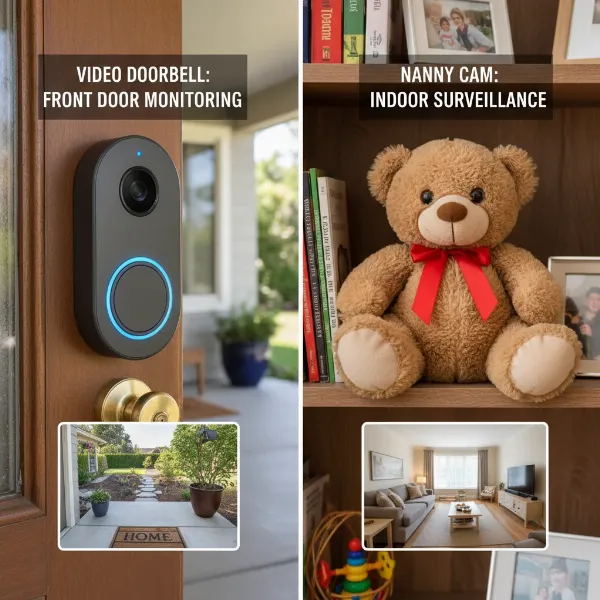 Comparing a video doorbell at a front door with a hidden nanny cam in a living room, highlighting their distinct placements and fields of view.
When to Choose a Video Doorbell
A video doorbell is an excellent choice for homeowners primarily concerned with monitoring their main entry point and managing external interactions. If your goal is to enhance front-door security, screen visitors, and protect against package theft, this device is a highly effective solution.
Opt for a video doorbell if you frequently receive deliveries and want to prevent “porch pirates” from stealing packages. The motion detection and two-way audio features allow you to monitor deliveries in real-time and even speak to drivers or potential thieves, deterring them instantly. Furthermore, if you want to know who is at your door before opening it, or interact with visitors when you’re not home, a video doorbell provides unparalleled convenience and peace of mind. Many video doorbells can also integrate with smart locks, allowing you to grant access remotely for trusted visitors or service providers. For those looking to deter potential burglars, the visible presence of a video doorbell can act as a significant deterrent, as criminals prefer houses without obvious surveillance.
When to Choose a Nanny Cam
A nanny cam, or indoor security camera, becomes the preferred choice when your primary need is internal home surveillance, especially for monitoring individuals or activities within your living space. These devices are invaluable for parents, pet owners, and those caring for elderly family members.
If you employ a nanny, babysitter, or caregiver, a nanny cam offers peace of mind by allowing you to discreetly observe their interactions and ensure proper care for your children or elderly relatives. It can confirm that routines are followed, and provide reassurance that your loved ones are safe and well-treated. Similarly, pet owners can use nanny cams to check on their furry companions, monitor their behavior, or even communicate with them remotely. For general indoor security, nanny cams can act as a discreet alert system for intruders, capturing evidence in the event of a break-in and providing crucial footage for law enforcement. The ability to place these cameras in various locations, often hidden, provides flexible and comprehensive coverage of your home’s interior, making them ideal for monitoring specific rooms or potential points of entry from within.
Can They Work Together?
Absolutely. Integrating both a video doorbell and nanny cams can create a comprehensive, multi-layered home security system that covers both external and internal threats. While each device serves a distinct purpose, their combined capabilities offer enhanced protection and a broader scope of surveillance.
A video doorbell acts as your front-line defense, monitoring the exterior of your home, specifically the main entrance. It handles all interactions with visitors, deliveries, and alerts you to any suspicious activity directly at your door. Simultaneously, strategically placed nanny cams (or indoor security cameras) can cover the interior of your home, monitoring living areas, children’s rooms, or other critical spaces. For example, your video doorbell might alert you to an unexpected visitor, while an indoor nanny cam can confirm that your children are safely tucked away or that no one else has entered through an alternative access point. Many modern smart home ecosystems allow various security devices, including video doorbells and indoor cameras from the same brand or compatible platforms, to work together seamlessly. This integration enables centralized control and monitoring through a single app, providing a holistic view of your home’s security status. By combining these tools, you achieve robust security that addresses both external entry points and internal activities, ensuring greater peace of mind whether you are at home or away.
So, Which One Is Best?
Deciding whether a video doorbell or a nanny cam is “best” ultimately depends on your individual security priorities and lifestyle. Neither device is inherently superior; rather, they excel in different aspects of home protection.
If your primary concern revolves around managing your front door—who comes and goes, securing package deliveries, and deterring potential intruders from the outside—a video doorbell is your optimal choice. Its specialized design offers direct interaction with visitors and constant surveillance of your entry point, providing immediate alerts for external activities.
However, if your main objective is to monitor internal activities, such as ensuring the well-being of children or elderly family members with a caregiver, keeping an eye on pets, or generally enhancing internal home security with discreet surveillance, then a nanny cam (or indoor security camera) will be more effective. Its versatility in placement and often hidden nature allows for comprehensive oversight of your indoor environment.
For the most robust and comprehensive home security, many homeowners find that the combination of both a video doorbell and strategically placed nanny cams offers the best of both worlds. This integrated approach ensures that both your home’s exterior entry points and interior spaces are under vigilant watch, providing maximum security and peace of mind. Consider your specific needs, budget, and desired level of coverage when making your decision.
Hướng dẫn chọn mua Video Doorbell phù hợp
Choosing the right video doorbell involves evaluating several factors to ensure it meets your specific security and convenience needs. Start by identifying your primary use case: Is it mainly for package theft, visitor screening, or general front-door deterrence? This will guide your feature priorities.
Buying Guide:
- Connectivity: Decide between wired or wireless (battery-powered) models. Wired doorbells offer continuous power but require existing doorbell wiring. Battery-powered options are easier to install but need periodic recharging.
- Video Quality: Look for HD (1080p) or 2K resolution for clear footage, essential for identifying faces and details. Good night vision is also crucial for low-light conditions.
- Field of View: A wider field of view (e.g., 160 degrees or more) is beneficial to capture a broader area around your door, including packages placed to the side.
- Motion Detection: Advanced motion detection with person and package detection helps minimize false alerts from pets or passing cars. Customizable motion zones are also a plus.
- Two-Way Audio: Ensure clear two-way communication to speak with visitors or delivery personnel.
- Storage Options: Consider whether you prefer cloud storage (often subscription-based for longer retention) or local storage (SD card) to avoid monthly fees.
- Smart Home Integration: If you have other smart devices (e.g., Alexa, Google Assistant), choose a doorbell that integrates seamlessly with your existing ecosystem.
- Brand Reputation & Reviews: Research reputable brands like Ring, Nest, Arlo, Eufy, and SimpliSafe, and read user reviews for reliability and customer support feedback.
- Budget: Video doorbells range widely in price. Determine your budget and look for the best features within that range.
- Warranty and Support: Check the manufacturer’s warranty and customer support options in case you encounter any issues.
By carefully considering these factors, you can select a video doorbell that provides effective front-door security and convenience for your home.
Hướng dẫn cài đặt và sử dụng Video Doorbell
Installing and using a video doorbell is typically a straightforward process, often designed for DIY enthusiasts. However, understanding the basic steps and common features will help you get the most out of your device.
Basic Installation Steps:
- Preparation: Turn off the power to your existing doorbell at the circuit breaker.
- Remove Old Doorbell: Unscrew and remove your old doorbell button.
- Wired Connection (if applicable): If you have a wired video doorbell, connect the existing doorbell wires to the terminals on the new video doorbell following the manufacturer’s instructions.
- Mounting: Secure the mounting bracket to your doorframe or wall using the provided screws. Attach the video doorbell to the bracket.
- Power On: Restore power at the circuit breaker.
- App Setup: Download the accompanying smartphone app, create an account, and follow the in-app instructions to connect your video doorbell to your home Wi-Fi network. This usually involves scanning a QR code or entering Wi-Fi credentials.
- Configuration: Customize settings such as motion detection zones, alert preferences, and video quality within the app.
Using Essential Features:
- Live View: Access the live video feed from your doorbell anytime through the app to see what’s happening outside your front door.
- Two-Way Talk: When someone rings the doorbell or motion is detected, you’ll receive an alert. Tap the notification to see who’s there and speak to them using the two-way audio feature.
- Event History: Review recorded video clips of detected motion events or doorbell rings, often accessible through a timeline in the app.
- Custom Alerts: Adjust notification settings to receive alerts only for specific events (e.g., person detection) to avoid unnecessary interruptions.
- Smart Integrations: If your doorbell is compatible, integrate it with other smart home devices or voice assistants for added automation and control.
Troubleshooting Tips:
- No Power/Offline: Check your circuit breaker and Wi-Fi connection. Ensure your router is within range or consider a Wi-Fi extender.
- False Motion Alerts: Adjust motion sensitivity settings or refine motion detection zones in the app to focus on relevant areas.
- Poor Video Quality: Check your Wi-Fi signal strength at the doorbell’s location. A strong signal is crucial for clear streaming and recording.
- Audio Issues: Ensure microphone and speaker settings are enabled in the app and check for any physical obstructions.
By following these guidelines, you can effectively install and manage your video doorbell, enhancing your home’s security and convenience.
Các lưu ý khi sử dụng Video Doorbell
While video doorbells offer significant security and convenience, it’s essential to be mindful of certain considerations to ensure responsible and effective use.
Bảo mật thông tin cá nhân
Your video doorbell collects sensitive data, including video footage and potentially audio recordings. It is crucial to use strong, unique passwords for your device and associated app accounts. Enable two-factor authentication (2FA) wherever possible to add an extra layer of security against unauthorized access. Ensure your home Wi-Fi network is secure with a strong password and up-to-date encryption protocols. Regularly update your doorbell’s firmware to benefit from the latest security patches and features provided by the manufacturer. Be cautious about sharing access to your doorbell’s feed, granting it only to trusted individuals.
Tuân thủ quy định pháp luật về quyền riêng tư
The legal landscape surrounding home surveillance, particularly for video and audio recording, varies by region. While it is generally legal to record video on your own property in public-facing areas, you must avoid pointing your camera directly into areas where neighbors have a reasonable expectation of privacy, such as their bedrooms or private yards. Many video doorbells offer privacy zone features that allow you to black out specific areas from recording.
Regarding audio recording, laws are stricter. Some jurisdictions operate under “one-party consent,” meaning only one person involved in a conversation needs to consent to being recorded. Others require “two-party consent,” where all parties must agree. It is advisable to research your local and state laws regarding audio recording to ensure compliance. If unsure, consider disabling the audio recording feature on your doorbell, or posting clear signage indicating that audio and video recording is in progress to inform visitors. Transparency is key to respecting privacy and avoiding potential legal issues.
Bảo trì và vệ sinh thiết bị
To ensure your video doorbell operates optimally, regular maintenance is recommended. Periodically clean the camera lens to remove dust, dirt, or spiderwebs that can obscure the view and reduce video quality. If your doorbell is battery-powered, keep an eye on the battery level and recharge it as needed. For wired models, ensure the wiring connections remain secure. Extreme weather conditions can sometimes affect performance; check the device for any visible damage after storms or prolonged exposure to harsh elements. Keeping your device clean and well-maintained will extend its lifespan and ensure it continues to provide reliable security for your home.
“Modern smart home security isn’t just about deterring threats; it’s about smart prevention and peace of mind. Devices like video doorbells offer that crucial first layer of awareness, integrating seamlessly into our connected lives.” – Sarah Chen, Smart Home Security Expert
Conclusion
Choosing between a video doorbell and nanny cam, or deciding to integrate both, represents a significant step towards enhancing your home’s security. Each device serves a unique and vital role: the Video Doorbell fortifies your front door, managing external interactions and deterring immediate threats, while nanny cams provide invaluable internal oversight for childcare, elder care, and discreet indoor surveillance. By understanding their distinct features, placement, and legal considerations, you can tailor a security strategy that perfectly fits your family’s specific needs and priorities. The ultimate goal is to create a secure and serene living environment where you feel protected and informed, whether you are at home or away.
What aspects of your home security do you prioritize most, and how might these smart devices help you achieve greater peace of mind?